


Carry The Casino In Your Pocket!
Experience smooth gameplay directly on your smartphone.
Play On MobileDolly Casino Without a Downloadable App: The Mobile Reality
Dolly Casino's mobile platform uses a browser-first approach. Players can access Dolly Casino through a mobile browser and add a convenient shortcut to their Home Screen for faster access. Registration, account access, casino games and sportsbook navigation all remain tied to the same web platform.
This changes what a Dolly Casino app download involves. The mobile setup is simple: open Dolly Casino in the browser, save the shortcut to the Home Screen and return directly whenever needed. Because the shortcut points back to the website, updates to the interface appear automatically without requiring a second casino installation.
For players looking for Dolly Casino mobile access, the shortcut provides a fast way to reach the platform without additional setup.
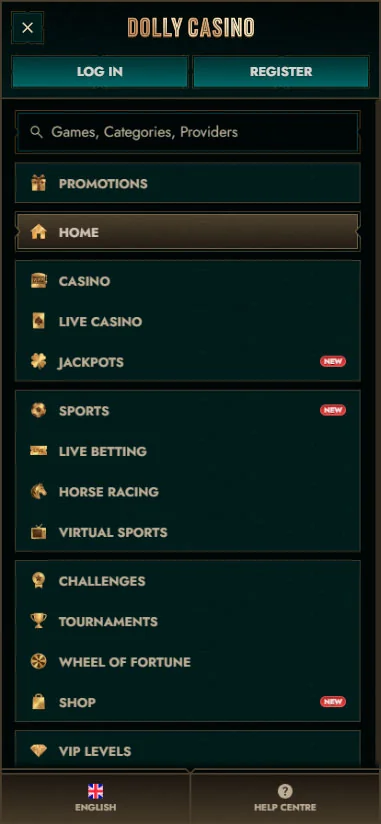
Getting Dolly Casino onto Your Android Home Screen
The Android setup may first offer an option to install the site through an available link. If that does not work, the browser menu provides a manual alternative.
Open Dolly Casino on your phone and tap the three-dot menu in the upper-right corner of the browser. Scroll through the available options until Add to Home screen appears, select it and choose the name you want to display beneath the new shortcut. Once confirmed, the browser adds an icon to the Home Screen. The icon gives you a direct route back to the website without requiring you to type the address again. The Dolly Casino shortcut connects to the existing account, allowing players to use the same login details and account information.
After creating the shortcut, open it once to make sure it returns to the expected Dolly Casino page rather than an old browser tab. Once the shortcut opens successfully, Dolly Casino is ready for convenient mobile access on Android.
Getting Dolly Casino onto Your iPhone Home Screen
The Dolly Casino iOS setup uses Safari's Share controls. Open the site, tap the icon showing an arrow coming out of a box, then scroll through the available actions until you find Add to Home Screen.
Select the option and confirm the shortcut. The resulting icon returns directly to the Dolly Casino web platform, so there is no separate App Store account, casino balance or second registration attached to it. Removing the shortcut later will not delete the player profile because the account exists on the website, not inside the Home Screen icon.
On iPhone and iPad, players can save Dolly Casino access through Safari’s Add to Home Screen option for quick return visits.
No Feature Gap between Phone and Desktop
Moving to a smaller screen does not create a second or stripped-down player account. Registration, login, the game catalogue, sportsbook and cashier all belong to the same web platform, while the shortcut simply makes the mobile entry point quicker.
The interface adapts to the phone display, but the main account functions remain connected with the same profile. A player can register, return to an existing account, browse casino titles, open live tables or move into sports markets without creating a separate mobile identity.
Signing Up and Passing Verification from a Phone
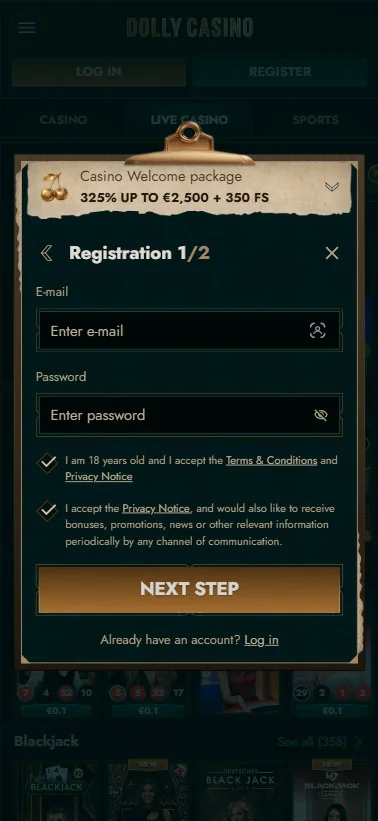
The registration sequence remains a two-stage process. The first screen asks for E-mail and Password, together with the mandatory 18+ confirmation and acceptance of the Terms & Conditions and Privacy Notice. A separate marketing checkbox is optional.
The next screen collects First Name, Last Name, Date of Birth, Sex, Country, Currency, Phone, Address, City and Postcode. Once those details are entered, the Create account action completes the profile.
Dolly Casino may request verification of identity, residence or payment ownership when required. Requested evidence may include certified ID, proof of residence, bank or payment transaction histories and proof that the payment method belongs to the account holder. Players normally have 30 days to provide the requested documents, while the standard review period after a complete response is up to 10 days. Phone or facial verification can also be used when further checks are required. The account and verification process remain connected to the same Dolly Casino profile across supported devices.
Spinning Slots and Watching Live Dealers
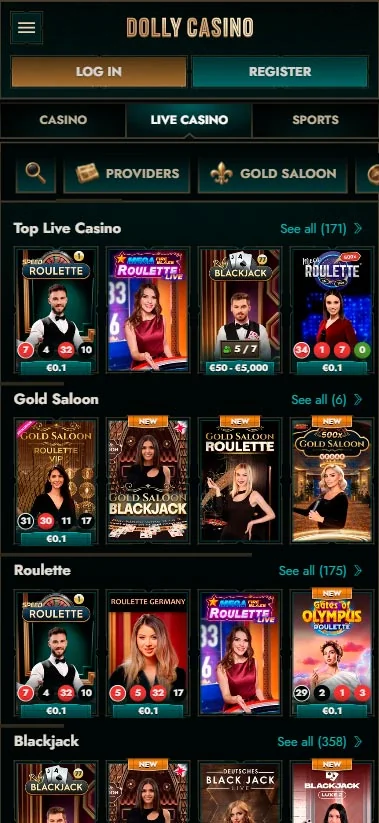
A phone does not limit you to a small mobile-only game list. The catalogue contains more than 10,000 listed slots, while jackpots and Live Casino have their own large sections. One example is Hot to Burn Jackpot Play, which has displayed a jackpot value of €554,698.20. Jackpot values can change over time, reflecting the current prize amount available for the selected game.
Live-dealer games also use the table-specific limits shown in the live lobby. Speed Roulette, for example, is available from €0.10 to €20,000. The wider Live Casino section includes Roulette, Blackjack, Baccarat & Dice, Poker, Game Shows and the Gold Saloon collection, with real dealers, live video and multiple camera views forming part of the experience.
Connection quality matters more for live games than for a simple account page because the video stream must continue while bets, cards or roulette results update in real time.
Placing a Bet with Boosted Odds on the Move
The sportsbook is also accessed through the browser. It includes In Play, Popular Bets, Upcoming events and Boosted Odds, while the Bet Slip is adapted to touch interaction with the instruction “swipe left to delete, right to accept”.
Decimal odds are available in the settings, together with the GMT+03:00 time zone. General sportsbook rules set the minimum wager at €1, while maximum stakes vary by event, sport and applicable jurisdiction. Single, Multiple and System bets can all be created through the sportsbook, and live markets remain available in the In Play section. Players should review their selections in the Bet Slip before confirming a bet, especially during live events where markets can change.
The Trade-Off: What a Shortcut Cannot Do
The Dolly Casino shortcut provides browser-based access to the platform. The shortcut connects players to the online Dolly Casino platform through their mobile browser. The Dolly Casino app shortcut does not turn the web platform into an offline casino. Games, live-dealer streams, payments and sports markets all require connectivity because the content and account information are loaded from the online service.
The shortcut is designed for quick access to the online platform and its available mobile features. Its purpose is to provide faster access by placing a Dolly Casino icon directly on the device Home Screen.
A stable browser and internet connection help provide a smoother Dolly Casino mobile experience. Convenience comes from faster access, while the browser continues to do the actual work.
Three Habits for a Smoother Mobile Session
Create the shortcut on the Home Screen you actually use instead of placing it several pages deep. Doing this after registration gives you one familiar return point and reduces the temptation to search for a random Dolly Casino link later. It is also worth keeping the browser updated before using time-sensitive sportsbook features. In Play markets can change as an event develops, and the Bet Slip needs to display the latest state correctly before a bet is confirmed. Android users should know where the three-dot menu is located, while iOS users should be familiar with Safari's Share menu in case the shortcut needs to be recreated.
Before opening a live video, check your connection as well. Speed Roulette, blackjack streams and other live tables move continuously, so a weak mobile connection is more noticeable there than when browsing a static promotion or checking the balance.
These habits help players maintain quick and reliable access to Dolly Casino from their mobile device. Once the correct shortcut exists, most of the mobile experience comes down to keeping the browser and connection reliable.
Conclusion
Dolly Casino's mobile route keeps things simple. You open the same web platform used for registration, games, betting and account management, then add it to the Home Screen through Create Shortcut. Android users do this through the browser's three-dot menu and Add to Home screen. On an iPhone, the route runs through Safari's Share button and Add to Home Screen. Both methods lead back to the existing player profile rather than creating another account.
The Dolly Casino mobile experience provides browser-based access with a convenient Home Screen shortcut. Slots, live tables and sports markets remain online, while the shortcut removes the repetitive step of finding the website each time you want to return.
FAQ
You Might Also Like

Bonus Money at Dolly Casino: How Every Offer Works
Dolly Casino combines several reward types into one bonus system, giving you different ways to increase your balance depending on how you prefer to...
Access Dolly Casino: Registration, Sign-In and Account Setup
Getting into Dolly Casino is easiest to understand as three checkpoints rather than one long form. First comes the welcome-offer selection, followed...